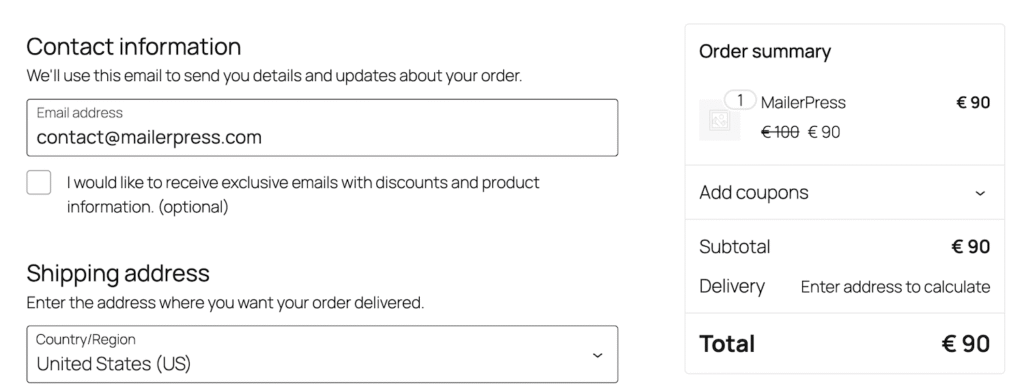
Collecting email addresses during the checkout process is one of the most effective ways to grow your mailing list and engage your customers with personalized offers. With MailerPress, you can easily add an opt-in checkbox to your WooCommerce checkout form and ensure subscribers are automatically tagged and organized for future campaigns.
Requirements
- MailerPress Pro version 1.0 or greater
- WooCommerce version (premium plugin)
Add a Checkbox to the Checkout Form of WooCommerce
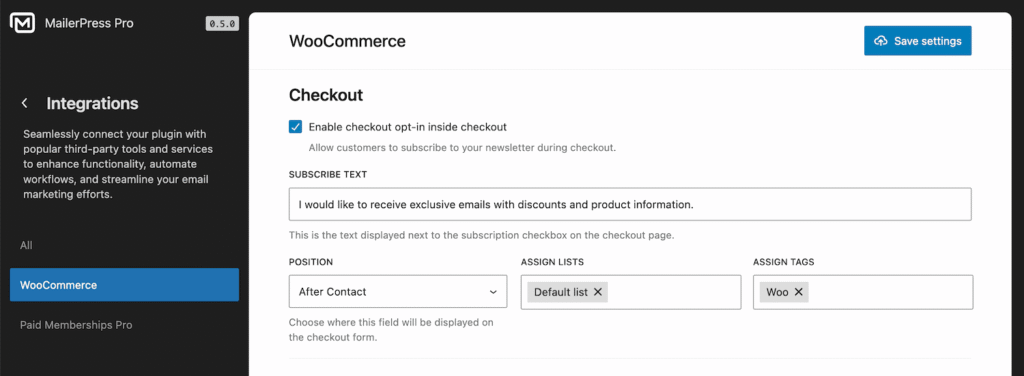
- Go to your WordPress dashboard and navigate to MailerPress, Integrations, WooCommerce.
- In the Checkout section, enable the Enable checkout opt-in option.
- Customize the default text for the checkbox, for example: “I would like to receive exclusive emails with discounts and product information.”
- Choose the checkbox placement:
- After contact
- After address
- Apply the desired lists and tags to easily manage subscribers in MailerPress.
By enabling this simple checkbox, you can seamlessly capture emails at checkout, grow your email list, and provide your customers with valuable content and offers — all while keeping your subscriber data organized in MailerPress.